

Using Flash, Strobes, Triggers, and Lighting with Outex Underwater Camera Housings
Apr 20, 2023
The Outex system is compatible with most, if not all, lighting solutions on the market — including hot-shoe flash, strobes, wireless triggers, detached lights, repeaters, and tethered setups. Like your camera, the Outex system is modular and grows with your needs as they evolve.
Wireless Signals: What Works and What Doesn't Underwater
Outex covers do not interfere with wireless transmitters — RF, WiFi, and IR signals all pass through the cover material without issue. This means wireless triggers, repeaters, and emitters continue to function normally when the camera is inside the housing.
However, water itself blocks wireless signals. RF, WiFi, and IR cannot reliably penetrate water. This means:
- Wireless triggers work when the camera is above the waterline or at the surface
- For fully submerged setups, wired connections are required
The Outex system is designed to accommodate this limitation through wired cable adaptors that enable underwater connections for triggers, tethering, power, audio, and video. These are available as add-on kits in the Accessories section.
Hot-Shoe Flash and Wireless Triggers Above Water
For above-water strobe setups, a wireless trigger mounted to the camera hot shoe inside the Outex cover will continue to fire above-water strobes normally. The cover does not block the signal.

Photographer Michael Stokes using a hot-shoe-mounted wireless trigger inside an Outex Pro Cover Large. The cover is inverted so the battery grip space accommodates the trigger. Above-water strobes fire normally via the wireless signal.
If you are using a larger camera body (Nikon Z9, Canon R3, etc.), the F Cover (Flash variant) provides a dedicated opening for a hot-shoe-mounted flash or trigger, in addition to the standard cover openings. All F Cover variants are available in both Pro Cover Regular and Pro Cover Large sizes.

Outex Pro Cover Regular — F variant (Flash). The "F" opening accommodates a hot-shoe-mounted flash or trigger. Available in Regular and Large sizes from the Accessories section.
Strobes and Tethering for Fully Submerged Setups
For fully underwater lighting setups, Outex supports wired connections to external strobes, lights, and tethering systems via cable adaptor openings in the Pro Cover (T1, T2, T3 variants). This allows the camera to trigger and synchronise with underwater strobes via a physical cable connection, bypassing the wireless signal limitation of water.

Tripod-mounted camera inside an Outex Pro Cover Regular with dome port, tethered to underwater strobes that fire in synchronicity with the camera. Read the full case study →
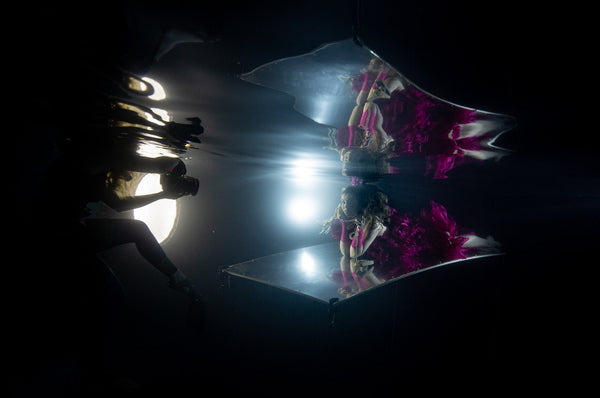
Outex system with waterproof LED lights — by photographer Kristina Sherk. Read the full case study →
Combining Wireless and Wired Lighting
You can combine above-water wireless strobes with underwater wired lighting in a single setup — for example, a wired underwater light tray combined with above-water wireless strobes triggered simultaneously. The Outex modular system supports this through the combination of F Cover openings and T-variant cable adaptor openings.

Photographer Brett Stanley using Outex with combined triggers, strobes, and tethering for an underwater shoot. Read the full case study →
Browse Lighting and Trigger Accessories
All lighting and trigger add-on kits are available in the Accessories section of the shop. Additional real-world examples can be found throughout the Community pages, including the Blog, Reviews, and News sections.
If you have questions about a specific lighting configuration or need help choosing the right accessory kit for your setup, contact the Outex support team:
- Email: support@outex.com
- Phone: +1 (818) 583-7731