

How to Choose the Right Outex Front Glass Port for Your Lens
Apr 23, 2023
Choosing the right Outex front glass port is straightforward once you know your lens filter thread size. This guide walks you through how to find it, how to match it to the correct port, and what to do if your lens doesn't have a filter thread.
3-Step Port Selection Guide
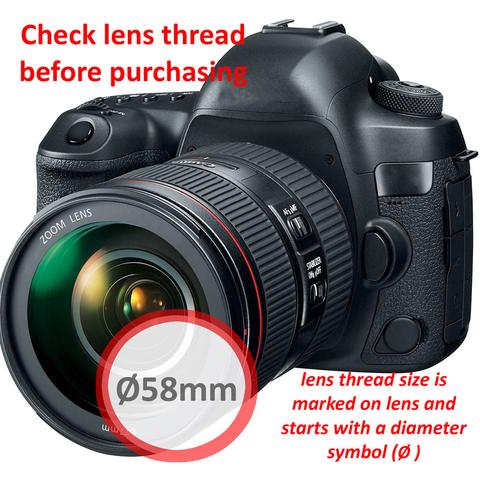
- Find your lens filter thread size — it's printed on your lens or lens cap with the symbol ⌀ (e.g. ⌀77 means 77mm). It is not your focal length or zoom range.
- Match that number to your Outex front port size — Outex supports all standard filter thread sizes from 49mm to 105mm.
- No filter thread? — If your lens is a fisheye, hooded, or curved-front lens without a filter thread, you need an Outex Dome Port instead of a flat port.
How to Find Your Filter Thread Size
The filter thread size is the diameter of the front of your lens in millimetres. It is always marked with the ⌀ symbol and is usually found:
- Printed on the front ring of the lens barrel
- Printed on the inside of the lens cap
- Listed in your lens manual or manufacturer's spec sheet
Important: The filter thread size is completely separate from your focal length or zoom range. A 24-105mm lens has a focal length range of 24–105mm, but its filter thread size might be 77mm — these are different measurements.
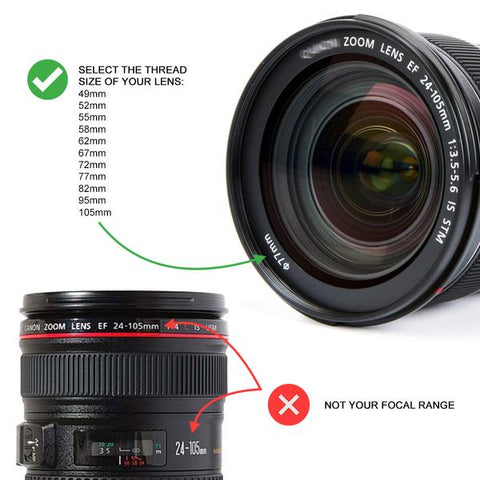
Example: focal length = 24–105mm, filter thread size = 77mm. You would order the Outex 77mm front port.

Why Outex Ports Are Sized to Filter Thread Diameter
Outex front glass ports are engineered to match industry-standard filter thread diameter sizes for two key reasons:
- Optimal optical positioning — the port threads directly onto your lens, just like a UV filter or polarizer. It becomes one with the lens, moving with it at all focal lengths. This eliminates vignetting, reflections, and the refraction issues common in housings where the port floats independently of the lens.
- Perfect fit every time — because the port anchors to the lens thread, there is no guesswork about alignment. The optical glass is always positioned correctly for that specific lens.
Outex supports all standard filter thread sizes from 49mm to 105mm. All front ports are interchangeable across all Outex cover sizes — you can purchase multiple ports and use them with any cover.
Why Optical Glass — Not Acrylic or Plastic
All Outex front glass ports use professional-grade optical glass, not acrylic or polycarbonate like most other underwater housings. The reasons are the same as why your camera lens uses glass:
- Superior image sharpness and clarity — glass maintains the optical standards of your lens itself.
- True color accuracy — no distortion or color shift introduced by the port material.
- Professional durability — glass is far more scratch-resistant than acrylic and performs reliably in demanding environments.
Photographers and filmmakers worldwide trust Outex because the glass ports maintain the same optical standards used in professional lenses and filters.

Two Outex Pro Kit systems showing flat port (left) vs. dome port (right) side by side.
Using Step-Up Rings
If you have a lens with a smaller filter thread than the port you own, you can use a step-up ring to bridge the gap. The rule is simple:
Always go larger, never smaller. Use a step-up ring to fit a smaller-thread lens into a larger port (e.g. a 77–82mm step-up ring with an 82mm Outex port for a 77mm lens). Never use a step-down ring to fit a larger-thread lens into a smaller port — this will cause significant vignetting, especially with wide-angle lenses.
Note that step-up rings may introduce some vignetting even when used correctly, particularly with wide-angle lenses, because they add physical distance between the lens and port. Using the correctly matched port size always delivers the best results.
When installing step-up rings, filters, or polarizers, do not over-tighten them onto the Outex front port — follow the same care you would with any lens accessory. See the Installation guide for full instructions.
Lenses Without Filter Threads: Use a Dome Port
Some lenses cannot accept a flat front port because they have no filter thread:
- Fisheye lenses
- Lenses with curved front elements
- Hooded lenses without a filter thread
For these lenses, an Outex Dome Port is required. Both Outex domes — the Dome 120mm and Dome 180mm — work with any lens via adaptors (for threaded lenses) or clamps (for unthreaded lenses). The dome is positioned and secured to the lens for optimal optical results and stability inside the cover.
- Dome adaptors — for lenses with filter threads (all sizes supported)
- Dome clamps — for lenses without filter threads (all sizes supported)

For a full explanation of dome ports, how they work, and when to use them vs. flat ports, see the Dome Ports vs. Flat Ports guide.
Compatibility Summary
- All Outex front glass ports (flat and dome) are compatible with all Outex cover sizes.
- Flat ports and dome ports are interchangeable — you can own and use both.
- Additional ports can be purchased individually from the Parts page.
- Kits include one front port size of your choice — add more sizes as needed.
Ready to Order Your Front Port?
Once you know your filter thread size, you can purchase the matching front glass port individually from the Parts page, or as part of a complete kit from the Camera Kits section.